
Introducing hal: a coding agent for R
Mark Dippold
2026-10-08
Source:vignettes/articles/introducing-hal.Rmd
introducing-hal.Rmd
I’m happy to announce that hal is now on CRAN:
install.packages("hal")hal is a coding agent for R. It isn’t another chat panel. It gives you an agent you call from R code. It can read your files, search your project, run R in your session, look at your plots, and hand results back as ordinary R objects you can pipe, test, and script.
Why another AI package?
Coding agents like GitHub Copilot and Claude Code are very capable,
but they were built for a terminal or an IDE sidebar. R users work in a
console, next to live data frames, models, and plots. An agent that
can’t see df is guessing.
hal connects the two. It talks directly to the agent tools you
already have, and it adds R-specific pieces: an eval_r tool
that runs code in your session, pipe-friendly verbs, verified
transforms, and plot capture. It needs no API keys,
because it uses the Copilot or Claude subscription you already pay
for.
Three verbs
hal(): have a conversation
A stateful, multi-turn session with full agent tool access:
library(hal)
hal_setup()   # picks the right backend for your setup

hal("What are the top 3 dplyr verbs and when would I use each?")
hal("Show me a filter example")
Add use_env = TRUE and the agent can inspect live
objects in your session instead of guessing at them:
df <- mtcars
hal("Which rows in df have above-median mpg?", use_env = TRUE)
hal_ask(): analyze mid-pipe
Pipe any object in, get analysis printed, and your data flows through unchanged:
mtcars |>
  hal_ask("What patterns stand out in fuel efficiency? 3 bullets.")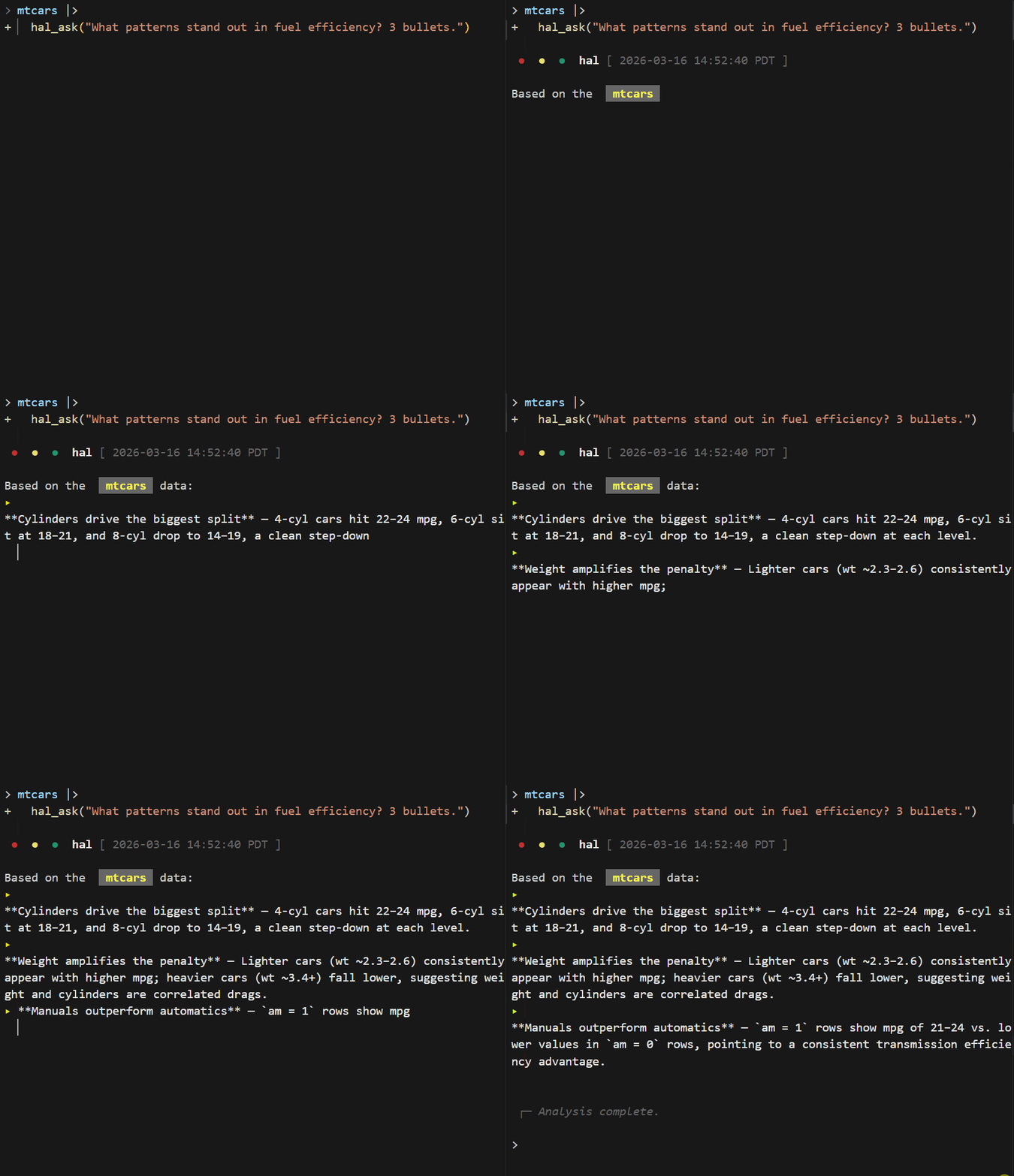
hal_do(): transform mid-pipe, with a receipt
hal_do() generates R code, runs it, and returns the
result. It then checks what changed:
mtcars |>
  hal_do("group by cylinder count, summarize mean mpg and mean hp")
#> i hal_do: 32 -> 3 rows | -9 cols (...) | +2 cols (mean_mpg, mean_hp)
Every transform gets a structural report covering row deltas, added
or dropped columns, class changes, and new NAs. Suspicious
results, such as output identical to the input or zero rows, raise a
warning. In scripts that run non-interactively, failures abort instead
of passing bad data downstream quietly.
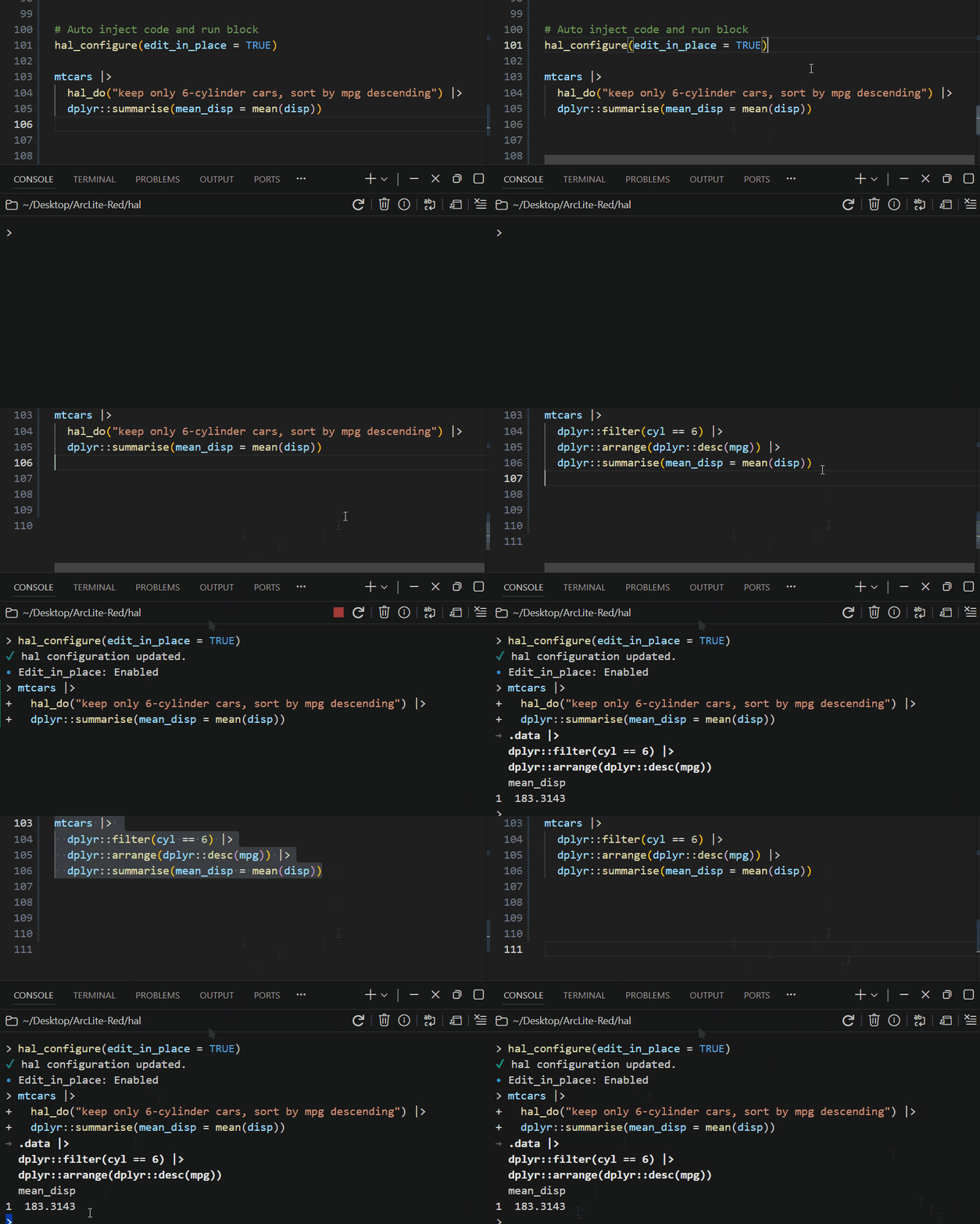
In RStudio or Positron, hal_do() can also replace itself
in your editor with the code it generated. You keep the code, and the
agent isn’t needed next time you run the script.
Two things I haven’t seen elsewhere
hal_excel() turns a spreadsheet into a verified
R script. It reads an .xlsx, translates each
formula column into a tidyverse expression, and then checks every
translation against the values Excel cached for that column, row by row.
Columns that match go into a runnable mutate() pipeline.
Anything that doesn’t match is left as a commented stub for you to
review, never silently guessed.
hal_excel("sales_model.xlsx")
#> v revenue: verified (120/120 rows match Excel)
#> v margin: verified (120/120 rows match Excel)
Plot vision. When the agent draws a plot through
eval_r, hal captures it and sends the image back to the
model. “Make this publication-ready” then works on what the chart
actually looks like, not on what the code suggests it might look
like.
Pick your backend
The same R API runs over three backends, and your code doesn’t change when you switch:
| Backend | What it uses | Good for |
|---|---|---|
| vscode (default in Positron) | Positron’s built-in language models via a bundled bridge extension | No extra install; reuses your Positron Copilot sign-in |
| copilot | GitHub Copilot CLI | Many models, mid-session model switching, Plan/Autopilot modes |
| claude | Claude Code CLI | Claude subscription users; quota visibility with
hal_quota()
|
hal_configure(backend = "claude")
hal_status()   # traffic-light check that tells you the next step
Guardrails
An agent that runs code in your session needs limits. hal includes:
- an
eval_rdenylist enforced by walking the code’s syntax tree, not by matching strings; - a credential scanner on outbound text that can warn, redact, or block;
- permission policies (
"auto-allow","auto-deny","ask", or your own R function); - classed conditions (
hal_error,hal_do_error, …) so you can catch failures programmatically.
The safety guide covers each of these.
Make your own tools
Any R function can become a tool the agent can call:
hal_register_tool(
  fun = function(ticker) paste("$142.50 for", ticker),
  name = "stock_price",
  description = "Get current stock price",
  types = list(ticker = "string")
)
hal("What's the stock price of AAPL?")
Try it and tell me what breaks
install.packages("hal")
library(hal)
hal_setup()
hal("Hello!")- Docs: https://arclite-red.github.io/hal/
- Code and issues: https://github.com/ArcLite-Red/hal
This is a 0.1 release, and I’d like to hear about bugs, rough edges, and workflows you’d want hal to handle. Issues and stars on GitHub help other R users find the package.